Improving the experience after AI video generation
Once Vizard generated a set of clips, creators still needed to decide what was useful, what needed editing, and what to prepare for sharing. My starting goal was to make that overall experience more coherent.
I began by investigating creator needs and the existing workflow. This work helped define which problems the redesign should address and where shared editing tools could support the larger task.
CREATOR JOURNEY MAP
From source video to usable clips
A synthesis of creator goals and workflow analysis.
Creator goals, actions, and design opportunities across six stages
Creator journey synthesized from goal mapping and workflow analysis.
02 / USER RESEARCH
Understanding creator goals before defining features
I developed user profiles and mapped goals across independent podcasters, social media managers, and coaches or consultants. I used this research to understand what creators needed to accomplish with their generated clips.
The profiles pointed to recurring needs around reviewing content, adapting clips for different channels, and maintaining a consistent presentation. These needs gave the redesign a task-based foundation.
RESEARCH PERSONA / 01
Anna Lee
Age: 28 · Independent Podcaster & Self-Media Creator · BA in Media Studies · Los Angeles, USA
Anna is a storyteller and independent content creator who runs her own video podcast channel. She manages every aspect of her content production—from scripting and recording to editing and publishing. Her goal is to grow her audience base, increase engagement, and eventually monetize her channel through sponsorships and paid memberships.
Anna is passionate about sharing authentic conversations and cultural commentary but often feels limited by her video editing skills and the time-consuming process of repurposing content for different platforms.
PERSONA STATEMENT
“I don’t need to become a pro editor—I just want tools that help me share my stories faster and keep my audience engaged.”
Goals
Primary
Consistently produce high-quality short clips to promote podcast episodes
Grow audience reach across multiple platforms (YouTube, TikTok, Instagram)
Increase engagement and attract sponsorship opportunities
Secondary
Repurpose long-form podcast episodes into multiple formats
Maintain a consistent brand style without advanced editing knowledge
Pain points
Editing and repurposing content across platforms is time-consuming
Limited video editing skills; struggles to polish clips for professional appeal
Hard to maintain consistent posting schedule while managing content alone
Difficult to stand out among the massive amount of online content
Subscription costs feel high when revenue is not stable
Needs & feature expectations
Core needs
AI-powered clip suggestions from long-form podcasts
Accurate, editable subtitles (multi-language support preferred)
Branded templates for thumbnails, intros, outros
Affordable subscription options for independent creators
Multi-platform export with aspect ratio presets (9:16, 1:1, 16:9)
Delight features
Auto-thumbnail generation with podcast branding
Podcast-specific analytics (audience retention, engagement per clip)
Voice enhancement and background noise reduction
Behaviors & workflow
Content Frequency: Publishes 2–3 podcast episodes monthly and 4–6 short clips weekly
Schedule posts for different platforms at optimal engagement times
Tool Preference: Affordable, intuitive UI, minimal clicks, smart automation, good cross-platform support
Behavior traits
ExpressiveResourcefulCreativeGoal-Driven
Personality
IntrovertExtrovert
AnalyticalCreative
BusyTime rich
MessyOrganized
RESEARCH PERSONA / 02
Mark Johnson
Age: 32 · Social Media Manager, Mid-size Tech Company · BA in Marketing & Communications · New York, USA
Mark is a social media professional who manages multiple brand accounts across different platforms. He is strategic, data-driven, and constantly keeps up with the latest social media trends and algorithms. His job is to grow brand awareness, generate leads, and maintain consistent engagement with target audiences.
Mark often juggles multiple tasks—content planning, creation, scheduling, and analytics tracking—which makes time management a big challenge. He values efficiency and needs tools that streamline video repurposing, performance measurement, and team collaboration.
PERSONA STATEMENT
“I need to quickly produce engaging content that works across multiple platforms while keeping track of performance metrics.”
Goals
Primary
Increase brand awareness and generate leads through video content
Boost engagement rates across platforms (Instagram, LinkedIn, TikTok, YouTube)
Maintain a consistent, professional brand image
Secondary
Repurpose long-form webinars or events into short-form marketing assets
Track and report analytics to stakeholders efficiently
Pain points
Managing multiple accounts and platforms is time-consuming
Struggles to consistently produce high-quality content due to resource limits
Difficult to balance creative tasks with performance tracking/reporting
Needs tools that support collaboration across marketing teams
Frustrated by tools that lack integration with analytics platforms
Needs & feature expectations
Core needs
Easy repurposing of long-form content into branded short clips
Accurate subtitles for SEO and accessibility
Multi-platform publishing with scheduling and performance analytics
Team collaboration features (role-based access, approvals)
Affordable pricing for enterprise/team packages
Delight features
Clip-level performance insights tied to engagement metrics
Competitors: Opus (similar features, but users don’t want to switch)
Preference: Professional-grade, collaboration-friendly, automation-powered, with built-in analytics
Behavior traits
StrategicCollaborativeTime-ConsciousData-Driven
Personality
IntrovertExtrovert
AnalyticalCreative
BusyTime rich
MessyOrganized
RESEARCH PERSONA / 03
Peter Hayes
Age: 35 · Coach/ Freelance Consultant · BA in Psychology · Canada
Peter is a subject matter expert who has been working in his field for over a decade. He has built credibility through years of client work and now wants to expand his reach by creating digital content. Peter films topic-focused videos to share insights, build trust with potential clients, and generate leads for his one-on-one coaching services.
He is comfortable speaking on camera and explaining complex ideas, but he is not a professional video editor. His business model relies heavily on producing consistent, high-quality short-form videos to drive traffic to long-form content or paid sessions.
PERSONA STATEMENT
“I’m not looking to become a pro video editor — I just need to turn my expertise into polished, shareable clips fast.”
Goals
Primary
Produce short videos quickly to promote long-form content
Increase online visibility across multiple platforms
Convert viewers into paying clients or course attendees
Secondary
Maintain a consistent brand style without needing advanced editing skills
Repurpose long content into multiple shorter assets efficiently
Pain points
Time-consuming to manually edit long videos into multiple short clips
AI tools sometimes select clips that miss emotional or impactful moments
Subtitles require frequent manual correction, especially for industry-specific terms
Struggles with consistent branding (thumbnails, intros/outros, transitions)
Frustrated by tools that require switching between multiple apps for one workflow
Finds multi-platform posting tedious without a scheduling feature
Needs & feature expectations
Core needs
AI-generated clip suggestions with editable in/out points
Research synthesis: these personas and their statements summarize creator profiles rather than individual interview participants.
RESEARCH SYNTHESIS / SHARED TASKS
Connecting persona goals to the creator workflow
Creator taskIndependent podcasterSocial media managerCoach / consultant
01Review & choose
Preview clips and transcripts
Prioritize clips for campaigns
Find useful short-video moments
02Refine & style
Edit multiple clips; adjust captions and format
Keep presentation consistent across channels
Add branding and improve clarity
03Prepare & share
Export clips for multiple platforms
Prepare branded assets for distribution
Repurpose content for different channels
DESIGN OPPORTUNITY
Bring shared editing tasks into the results workflow.
The original podcaster goal map explicitly identifies applying editing features to multiple clips at once.
View the original English goal maps
Shared tasks identified across the three creator goal maps.
03 / WORKFLOW ANALYSIS
Mapping how creators move from results to usable clips
I examined the existing results page and mapped its functions against the creator workflow. The flow analysis raised questions about what multi-selection enabled, which edits belonged in a lightweight workflow, and how creators could revisit settings.
The previous interface repeated controls such as Ratio, Trim, and Edit beside each clip. Alongside the research into shared editing needs, this suggested an opportunity to connect clip review and selection with common adjustments.
BEFORE / EXISTING RESULTS WORKFLOWS
Unifying workflows during an AI model upgrade
As Vizard upgraded its AI, two different models powered separate results experiences: the existing model behind One-click viral shot and the new multimodal model, Spark 1.0. The design challenge was to bring both into one consistent creator workflow for reviewing, selecting, and editing AI-generated clips.
Before integration: the two model-specific workflows, redrawn from my FigJam Information map. Compare their existing functions and relationships to understand what needed to come together in one results experience. Click to enlarge.
BEFORE / PER-CLIP CONTROLS
Ratio, Trim, and Edit repeat beside individual clips. Cropped from the original results-page design.
WORKFLOW AUDIT
Generated clips→Review & select→Refine results
WORKFLOW QUESTION
What is multi-selection for?
How often is it used?
Why does it belong here?
Workflow analysis note
LIGHTWEIGHT EDITING
What if a creator wants to trim two segments?
Which needs should the lightweight editor address?
Editing exploration note
REVISITING SETTINGS
If a creator needs to change a parameter, such as clip length, how do they go back?
Workflow analysis note
Questions that guided the workflow analysis.
04 / DEFINING THE DESIGN DIRECTION
Connecting selection with shared editing
The goal map identified a need to edit multiple clips at once. I translated that need into a workflow: choose the clips, access a shared tool, and make the scope of the action visible.
FROM RESEARCH TO BULK EDITING
01 / RESEARCH NEED
Support the same adjustment across multiple clips.
The podcaster goal map explicitly called for editing multiple clips at once.
ORIGINAL FIGJAM / GOAL MAPPING
Research synthesis from my podcaster goal map.
ILLUSTRATIVE SCENARIO
Clip ACaptions
Clip BCaptions
Clip CCaptions
Three clips need the same caption styling. A shared adjustment can reduce repeated setup.
02 / DEFINE THE SHARED ACTIONS
Translate common editing needs into focused tools.
Format, captions, and visual style became concrete shared-editing tasks.
FROM CREATOR NEED TO EDITING TOOL
Adapt clips to a channel’s format→Change ratio
Keep caption styling consistent→Subtitle
Use a consistent visual style→Template
03 / CONNECT SELECTION WITH EDITING
Select clips, open a shared tool, and apply an adjustment.
Selection defines the target clips; a shared tool provides the adjustment.
ILLUSTRATIVE FLOW / ONE TYPE OF ADJUSTMENT
1Select clips
Choose the clips to change.
2Open a tool
Choose an adjustment, such as Subtitle.
3Apply the adjustment
Use the setting across the selection.
Illustrative flow for applying one type of adjustment to selected clips.
04 / CLARIFY THE ACTION SCOPE
Make it clear which clips an action will affect.
Creators need to see which clips are included before applying an edit.
FINAL UI / SELECTION DETAILS
Checkboxes identify the selected clips.
The selected count confirms how many clips are included.
The shared toolbar keeps editing actions beside the results.
SHARED TOOLS
From the original goal-map need to the selection and editing workflow.
05 / DESIGN EXPLORATION
Exploring a connected results and editing workspace
The first exploration grouped General, Content, and Style settings in a Quick Edit sidebar. It also explored saving reusable presets and configuring different adjustments before submitting them together.
EXPLORATION / QUICK EDIT
Early exploration: review clips and adjust settings in a shared sidebar.
EXPLORATION / DEFERRED SCOPE
Reusable settings
Preset controls explored how creators could reuse a configuration.
One submission
Save / Reset grouped the explored adjustments into a consolidated editing model.
Outside final scope
Original sidebar exploration. Presets and combined submission were deferred.
06 / DESIGN TRADEOFFS
Reducing scope while preserving multi-clip editing
The PM and company leadership made the scope decision to move away from the consolidated Quick Edit approach. The requirement to retain was clear: creators must still be able to select multiple clips and apply an edit to that selection.
My design response was to adapt the interface to separate toolbar actions. Each tool supports a focused adjustment across the selected clips. Reusable presets and submitting different adjustments together remained outside the final delivery.
EXPLORATION
SCOPE DECISION / PM & LEADERSHIP
Keep multi-selection + Apply
I adapted the shared editing controls into separate tools while keeping edits available across selected clips.
→
FINAL DELIVERY
From consolidated settings to separate tools: multi-selection and applying an edit remained central to the final design.
What stayed, and what was left out
FINAL DELIVERY
Select multiple clips and apply an edit
Creators can still make a shared change without editing each selected clip individually.
DEFERRED
Reusable presets and combined submissions
Different adjustments are handled through separate tools rather than configured and submitted together.
07 / FINAL DESIGN
Connecting clip selection with shared editing tools
The final results-page design brings clip review, selection, and editing controls into one workspace. Creators can choose which clips to work on and access tools for ratio, templates, subtitles, and other adjustments from the results page.
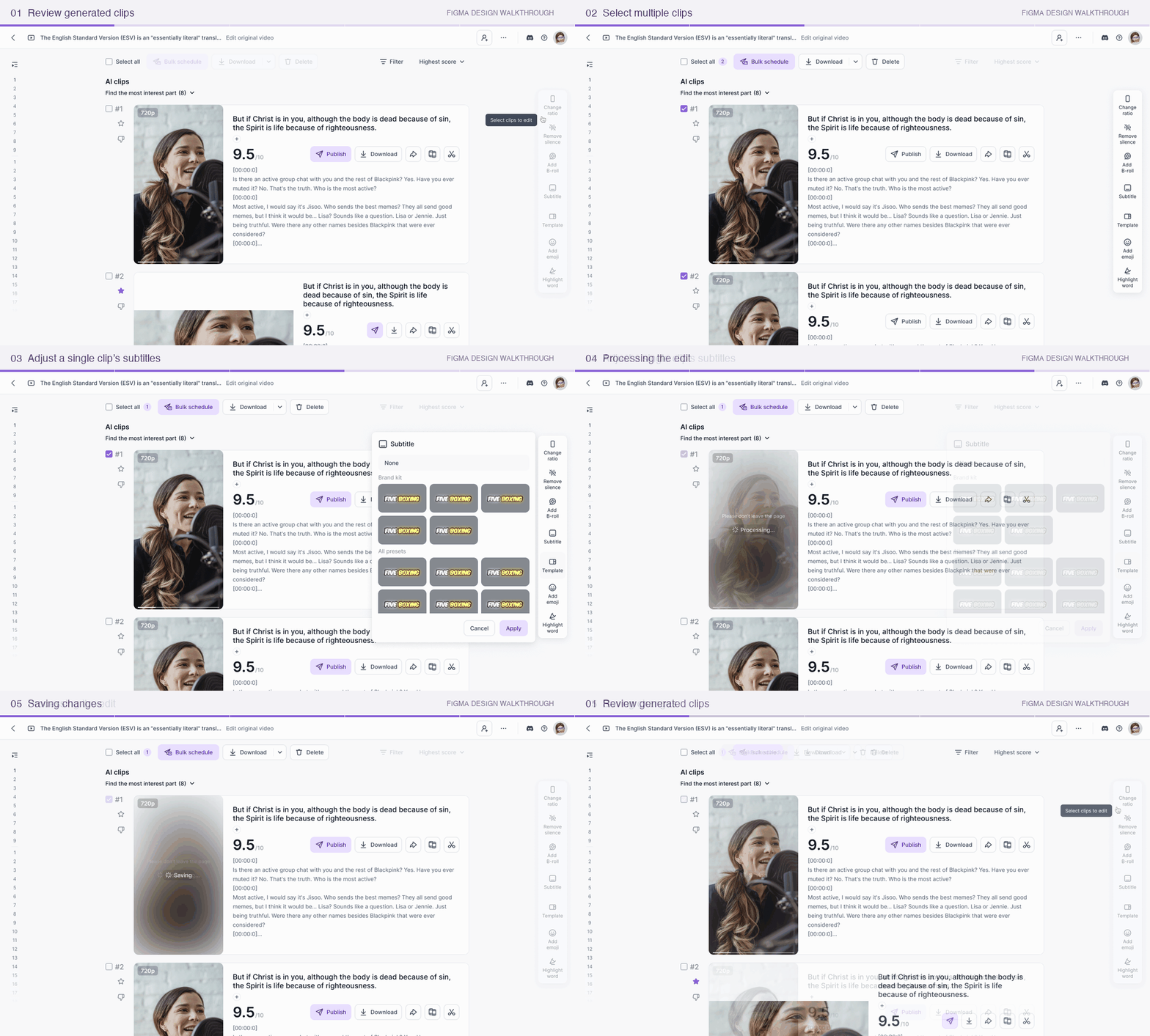
I specified no-selection, single-selection, and multi-selection states. Checkboxes and a selected count communicate the target clips; focused settings panels provide Apply and Cancel actions. Creators retain control over both the clips they select and the settings they apply.
Final design: results workspace, template selection, and shared editing toolbar.
INTERACTION WALKTHROUGH
Design walkthrough · Animated states
01Review the contentPreview clips and read transcripts.
02Choose the scopeSelect the clips to adjust.
03Access shared toolsOpen the relevant editing action.
Design walkthrough: multi-selection and single-clip subtitle editing, shown through animated design states.
NO SELECTION
No clips selected; shared editing tools appear inactive.
ONE SELECTED CLIP
One checked clip and a selected count of 1.
TWO SELECTED CLIPS
Two checked clips and a selected count of 2.
08 / DELIVERY AND REFLECTION
Final handoff and reflection
I delivered the results-page structure, selection states, editing controls, and supporting feedback specifications. The final design supports a shared adjustment across selected clips; reusable presets and combined submissions remained outside this delivery.